I have a lot of vinyl records from my dad and uncle (who once worked at his college radio station and snagged a bunch of vinyl headed for the trash) as well as my wife who owns several vinyl albums of her own. Instead of buying a new speaker with an aux port, I wanted to play our turntable through my existing Sonos setup. Unfortunately the only official way to pull this off is to spend hundreds on a Sonos Port or a new turntable just to get it working.
 My vinyl collection.
So my goal was simple: find a way to build an audio bridge that turns analog input from my turntable into a local “radio station” Sonos can play, then make it easy to use so that dropping the needle automatically takes over my living room audio.
This post is a practical, modern version of approaches outlined in similar guides. My approach focuses on reliability and stability - I want to listen to vinyl, not troubleshoot!
The plan: Analog turntable audio → Raspberry Pi capture → Icecast stream → Sonos plays it as a radio station
So that’s it. Once the stream exists, Sonos doesn’t care that it came from a turntable, it just plays a URL. As a side benefit, this stream will be AirPlay ready as well.
Why this approach
- Cheap: often uses parts you already have (maybe you have a RPi collecting dust from a failed project like I did)
- Whole‑home: any Sonos or AirPlay-compatible can play the stream
- User friendly: put your phone away and enjoy the music
The parts list
- A turntable and some good records: we own an Audio-Technica AT-LP60XBT. If you buy a USB enabled version you may be able to connect directly to the Pi and skip the HAT or USB interface
- Raspberry Pi: I used a Pi Zero W which proved enough for a single stream
- MicroSD card: 8-16GB should be plenty
- Power supply
- A way to get analog audio into the Pi
- USB audio interface: Many guides use the Behringer U‑Phono UFO202. These were not easy to find. Or…
- Audio HAT with line‑in: Much cleaner implementation than the Behringer I think. It was challenging to find a HAT with proper line-in that was in stock. As far as I can tell the Raspiaudio Ultra+ (WM8960) that I used is the clear best option here
- Turntable → Pi input cable: 3.5mm or RCA depending on your turntable/interface
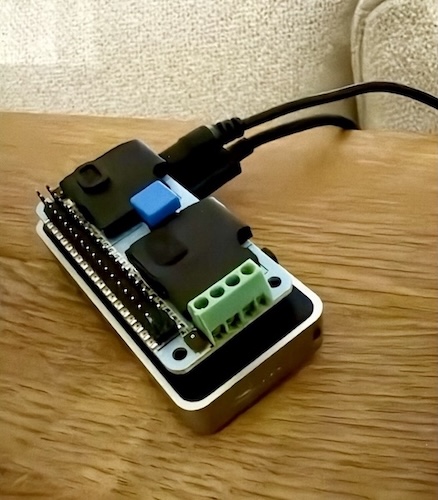 My RPi Zero W with the Raspiaudio Ultra+ HAT and a Flirc case.
Note: On the Raspiaudio Ultra+, it’s easy to plug into the wrong 3.5mm jack at first. The turntable should go into the Stereo external line input (the board diagram labels this as #4). I and other users received a board with a misprint, for me line-in was actually #5 as you can see in the photo above.
If you only hear faint audio when a plug is half inserted, that usually means you’re in the wrong jack or using a headset-style plug. Use a standard 3.5mm TRS stereo cable.
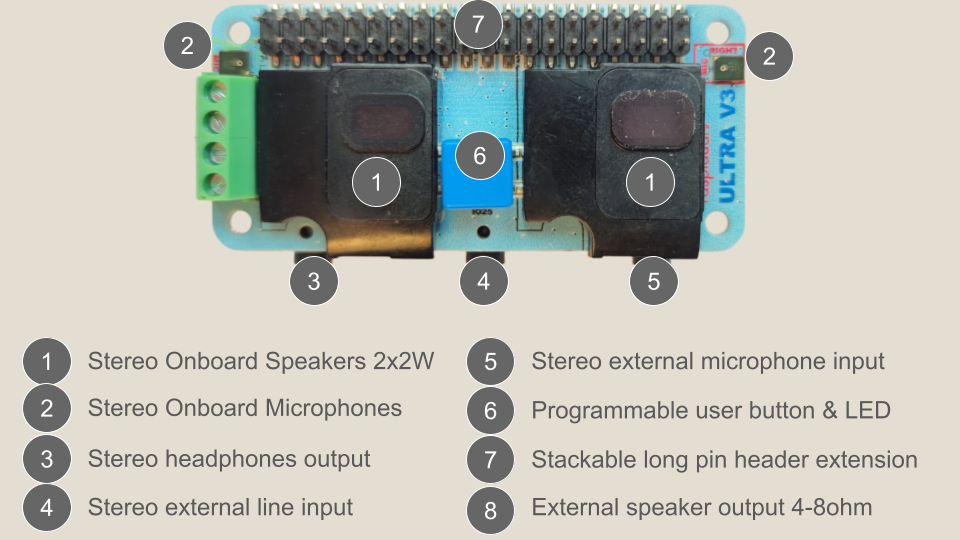 Ultra+ port map: line input should be #4.
Software components
-
Icecast — the tiny streaming server that exposes a URL like:
http://<pi-ip>:8000/turntable -
Capture + encoder — reads your line‑in and pushes audio into Icecast. You can do this with
arecord | ffmpegor withdarkice(many guides use DarkIce) -
Sonos — plays the stream as a custom radio station
-
Optional automation daemon — detects “music vs silence” and tells Sonos to switch to vinyl and back
-
Optional AirPlay method — VLC on iOS is a free, open source way to open the Icecast stream and send it to any AirPlay destination (probably handles Chromecast too?)
Turntable settings
If your turntable has a PHONO/LINE switch:
- Use LINE when feeding a USB interface or Pi line‑in
- Use PHONO only if you have a dedicated phono preamp in the chain
The build
Step 1: Confirm the Pi can see your audio input
Once your pi is setup, list capture devices:
arecord -lYou’ll see a “card” and “device” for your USB interface or audio HAT.
**** List of CAPTURE Hardware Devices ****
card 1: wm8960soundcard [wm8960-soundcard], device 0: bcm2835-i2s-wm8960-hifi wm8960-hifi-0 [bcm2835-i2s-wm8960-hifi wm8960-hifi-0]
  Subdevices: 0/1
  Subdevice #0: subdevice #0
Step 2: Icecast (create the local “radio station”)
Install and enable Icecast (package name varies by distro; on Raspberry Pi OS it’s typically icecast2):
sudo apt update
sudo apt install icecast2
sudo systemctl enable --now icecast2
Verify Icecast status page loads in your browser:
http://<pi-ip>:8000/
Step 3: Feed the turntable into Icecast
One simple pattern (example only, swap in your variables):
arecord -D <YOUR_CAPTURE_DEVICE> -f cd | \
ffmpeg -re -f s16le -ar 44100 -ac 2 -i - \
  -acodec libmp3lame -b:a 192k -content_type audio/mpeg \
  -f mp3 icecast://source:<SOURCE_PASSWORD>@localhost:8000/turntable
Now you should be able to open:
http://<pi-ip>:8000/turntable
…and hear your turntable.
Step 3.5 (important): alsamixer input gain and disabling the HAT speakers
This is the part that took me the most “fiddling” the first time.
- The goal is: a healthy input level into the ADC (so the stream isn’t quiet/noisy)
- And optionally: no local playback (so the HAT doesn’t also play out its onboard speaker/headphone jack)
I used alsamixer for the WM8960 card and:
- Muted playback paths so the HAT didn’t output audio locally
- Left only the line input / ADC paths enabled at a sane level
- Tweaked input gain until the stream sounded strong but not distorted (avoid clipping)
Tip: If you mute/disable everything and the stream goes silent, you probably disabled the input path (ADC) along with playback. Bring back only the input/ADC-related sliders first, then re-mute playback.
Step 4: Add the stream to Sonos
Add your Icecast URL as a custom radio station in the Sonos app (varies slightly by controller version).
Once added, test to see if you can play the station on a speaker. That’s it!
Step 5 (optional): Auto-switch Sonos when vinyl starts/stops
This makes playing records user friendly and avoids fumbling around with your phone. Just drop the needle and audio takes over the target Sonos device or group. In my case I set it up to play on my home theater setup. It will automatically overtake the TV audio when the music starts and resume it when music stops.
The idea
- Monitor the Icecast stream audio level (RMS)
- If “active” for a bit → tell Sonos to play the station
- If “silent” for long enough → switch back to TV input (or other activity)
Sonos control via Python (SoCo)
SoCo is the Python library that makes Sonos control simple:
Note: If your Pi is on a different subnet/VLAN than Sonos, SSDP discovery may not work. The workaround is easy: control Sonos by direct IP (unicast) instead of relying on discovery.
Make it reliable
Run everything as systemd services
Three services are needed:
icecast2(server)turntable_stream(producer:arecord→ffmpeg)vinyl_sonos(automation)
Check out the Appendix below for exact copies of the files I used. Note that the icecast service will be created automatically.
With Restart=always, everything comes back after reboots or power interruptions.
Don’t trust ALSA “card numbers”
Card numbering can flip between boots. Use a stable alias in /etc/asound.conf (example):
pcm.turntable {
    type hw
    card "wm8960soundcard"
    device 0
}
Then your producer uses -D turntable instead of hw:1,0.
Keep updates safe
If this Pi is a “set it and forget it” appliance:
- enable unattended security upgrades
- consider holding kernel packages if your audio HAT is sensitive to kernel changes
Wrap-up
This ended up being a fun project that behaved like a Sonos Port for a fraction of the cost. User friendliness was important to me:
- Drop needle → Sonos switches to vinyl
- Lift needle → Sonos returns to TV audio
- Stream stays up; everything restarts on reboot; minimal maintenance
I hope this proves helpful for your own setup!
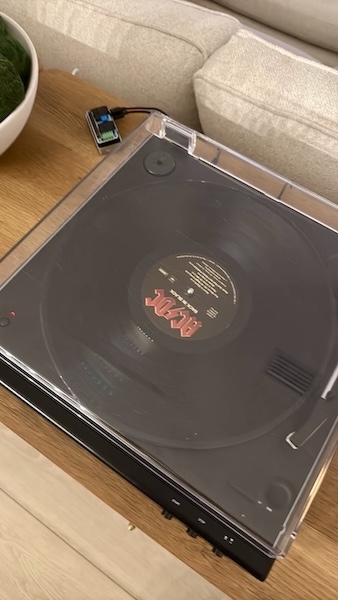 My RPi and turntable together.
References
- Instructables “Stream AUX and Bluetooth Through Raspberry Pi…” (updated approach)
https://www.instructables.com/Stream-AUX-and-Bluetooth-Through-Raspberry-Pi-to-W/ - Instructables “Add Aux to Sonos Using Raspberry Pi” (classic)
https://www.instructables.com/Add-Aux-to-Sonos-Using-Raspberry-Pi/ maxvfischer/sonos-streamingrepo (very similar goal: analog → Sonos)
https://github.com/maxvfischer/sonos-streaming
Appendix: Artifacts from my setup
turntable_stream.service
# /etc/systemd/system/turntable_stream.service
[Unit]
Description=Turntable -> Icecast FFmpeg Stream
After=network-online.target icecast2.service
Wants=icecast2.service

[Service]
User=<user>
Group=<user>
WorkingDirectory=/home/<user>

ExecStart=/bin/bash -lc '/usr/bin/arecord -D turntable -f cd | /usr/bin/ffmpeg -re -f s16le -ar 44100 -ac 2 -i - -acodec libmp3lame -b:a 192k -content_type audio/mpeg -f mp3 icecast'

Restart=always
RestartSec=5
StandardOutput=journal
StandardError=journal

[Install]
WantedBy=multi-user.target
vinyl_sonos.service
# /etc/systemd/system/vinyl_sonos.service
[Unit]
Description=Vinyl -> Sonos auto-switch daemon
After=network-online.target turntable_stream.service
Wants=turntable_stream.service

[Service]
User=<user>
Group=<user>
WorkingDirectory=/home/<user>
Environment="VIRTUAL_ENV=/home/<user>/vinyl-env"
Environment="PATH=/home/<user>/vinyl-env/bin:/usr/local/sbin:/usr/local/bin:/usr/sbin:/usr/bin:/sbin:/bin"
ExecStart=/home/<user>/vinyl-env/bin/python /home/<user>/vinyl_sonos_daemon.py
Restart=always
RestartSec=5
StandardOutput=journal
StandardError=journal

[Install]
WantedBy=multi-user.target
vinyl_sonos_daemon.py
#!/usr/bin/env python3
import subprocess
import time
import sys
import numpy as np
import soco

# ==========================
# CONFIGURATION
# ==========================

# Sonos Arc IP (fixed, since Pi is on a different subnet)
SONOS_ARC_IP = "<sonos-ip>"

# Your Icecast stream URL
ICECAST_URL = "http://<pi-ip>:8000/turntable"

# Detection tuning
CHUNK_SECONDS = 0.05  # analysis window size (smaller = more responsive)
ACTIVE_SECONDS_TO_TRIGGER = 1  # how long audio must be present to trigger
SILENCE_SECONDS_TO_STOP = 45  # how long silence before stopping

# RMS thresholds (tweak if needed)
RMS_ACTIVE_THRESHOLD = 500  # above this = "audio present"
RMS_SILENCE_THRESHOLD = 150  # below this consistently = "silent"

# Turntable state
STATE_FILE = "/tmp/vinyl_state"

# Logging verbosity
DEBUG = False


# ==========================
# SONOS CONTROL
# ==========================


class SonosController:
    def __init__(self, arc_ip):
        self.arc_ip = arc_ip
        self.zone = None
        self.resume_tv = False

    def connect(self):
        self.zone = soco.SoCo(self.arc_ip)
        print(
            f"[sonos] Connected to {self.zone.player_name} at {self.arc_ip}", flush=True
        )

    def on_vinyl_start(self):
        if not self.zone:
            self.connect()

        try:
            # Check if TV was playing before we override it
            try:
                is_tv = self.zone.is_playing_tv
            except Exception:
                is_tv = False

            self.resume_tv = bool(is_tv)
            print(
                f"[sonos] Vinyl start detected. was_tv_playing={self.resume_tv}",
                flush=True,
            )

            # Start playing the Icecast stream on the Arc group
            self.zone.play_uri(ICECAST_URL, title="Turntable", force_radio=True)
            print("[sonos] Switched to turntable stream.", flush=True)

        except Exception as e:
            print(f"[sonos] Error on_vinyl_start: {e}", file=sys.stderr, flush=True)

    def on_vinyl_stop(self):
        if not self.zone:
            self.connect()

        try:
            print(
                f"[sonos] Vinyl stop detected. resume_tv={self.resume_tv}", flush=True
            )

            # Stop the stream
            self.zone.stop()

            # If TV was playing before, switch back to TV
            if self.resume_tv:
                try:
                    self.zone.switch_to_tv()
                    self.zone.play()
                    print("[sonos] Switched back to TV.", flush=True)
                except Exception as e:
                    print(
                        f"[sonos] Error switching back to TV: {e}",
                        file=sys.stderr,
                        flush=True,
                    )

            self.resume_tv = False

        except Exception as e:
            print(f"[sonos] Error on_vinyl_stop: {e}", file=sys.stderr, flush=True)


# ==========================
# AUDIO ACTIVITY DETECTION
# ==========================


def rms_from_chunk(chunk_bytes):
    """Compute RMS from a chunk of 16-bit stereo PCM."""
    if not chunk_bytes:
        return 0.0
    data = np.frombuffer(chunk_bytes, dtype=np.int16)
    if data.size == 0:
        return 0.0
    samples = data.astype(np.float32)
    rms = np.sqrt(np.mean(samples**2))
    return float(rms)


def stream_rms_monitor(sonos_ctrl):
    """
    Connect to ICECAST_URL via ffmpeg, decode to PCM,
    compute RMS in small windows, and call Sonos actions
    on state transitions.
    """
    bytes_per_sample = 2  # 16-bit
    channels = 2
    sample_rate = 44100
    chunk_size = int(sample_rate * CHUNK_SECONDS) * channels * bytes_per_sample

    active_needed = max(1, int(ACTIVE_SECONDS_TO_TRIGGER / CHUNK_SECONDS))
    silent_needed = max(1, int(SILENCE_SECONDS_TO_STOP / CHUNK_SECONDS))

    active_count = 0
    silent_count = 0
    state = "silent"  # "silent" or "active"

    while True:
        cmd = [
            "ffmpeg",
            "-hide_banner",
            "-loglevel",
            "warning",
            "-reconnect",
            "1",
            "-reconnect_streamed",
            "1",
            "-reconnect_delay_max",
            "2",
            "-rw_timeout",
            "5000000",  # 5 seconds
            "-i",
            ICECAST_URL,
            "-f",
            "s16le",
            "-acodec",
            "pcm_s16le",
            "-ac",
            "2",
            "-ar",
            "44100",
            "-",
        ]

        print("[detector] Starting ffmpeg decoder for stream...", flush=True)
        proc = subprocess.Popen(cmd, stdout=subprocess.PIPE)

        try:
            while True:
                chunk = proc.stdout.read(chunk_size)
                if len(chunk) < chunk_size:
                    print(
                        "[detector] Short read from ffmpeg, restarting...", flush=True
                    )
                    break

                rms = rms_from_chunk(chunk)
                if DEBUG:
                    print(f"[detector] RMS={rms:.1f}", flush=True)

                if rms >= RMS_ACTIVE_THRESHOLD:
                    active_count += 1
                    silent_count = 0
                elif rms <= RMS_SILENCE_THRESHOLD:
                    silent_count += 1
                    active_count = 0
                else:
                    active_count = max(0, active_count - 1)
                    silent_count = max(0, silent_count - 1)

                if state == "silent" and active_count >= active_needed:
                    state = "active"
                    open(STATE_FILE, "w").write("active\n")
                    active_count = 0
                    print("[detector] State change: silent -> active", flush=True)
                    sonos_ctrl.on_vinyl_start()

                elif state == "active" and silent_count >= silent_needed:
                    state = "silent"
                    open(STATE_FILE, "w").write("silent\n")
                    silent_count = 0
                    print("[detector] State change: active -> silent", flush=True)
                    sonos_ctrl.on_vinyl_stop()

        finally:
            try:
                proc.terminate()
            except Exception:
                pass
            try:
                proc.wait(timeout=2)
            except Exception:
                pass

        time.sleep(1)


def main():
    sonos_ctrl = SonosController(SONOS_ARC_IP)
    sonos_ctrl.connect()

    while True:
        try:
            stream_rms_monitor(sonos_ctrl)
        except KeyboardInterrupt:
            print("Exiting on Ctrl+C", flush=True)
            break
        except Exception as e:
            print(f"[main] Error in monitor loop: {e}", file=sys.stderr, flush=True)
            time.sleep(5)


if __name__ == "__main__":
    main()